


ducati-configuration

Bénéficiez de l’accompagnement
Clé en Main Digitaleo
Pour faire remonter votre établissement dans les top résultats Google !
It's very simple

Partagez avec Kawasaki la gestion de votre fiche Google.
This step is essential if you want to benefit from Digitaleo’s turnkey support.
En partageant votre fiche, vous en restez propriétaire et conservez toutes vos photos, avis et autres données existantes. Vous donnez néanmoins accès au réseau Kawasaki aux données suivantes : nom, prénom et coordonnées de la fiche Google (nom de l’établissement, adresse, horaires, téléphone).
-
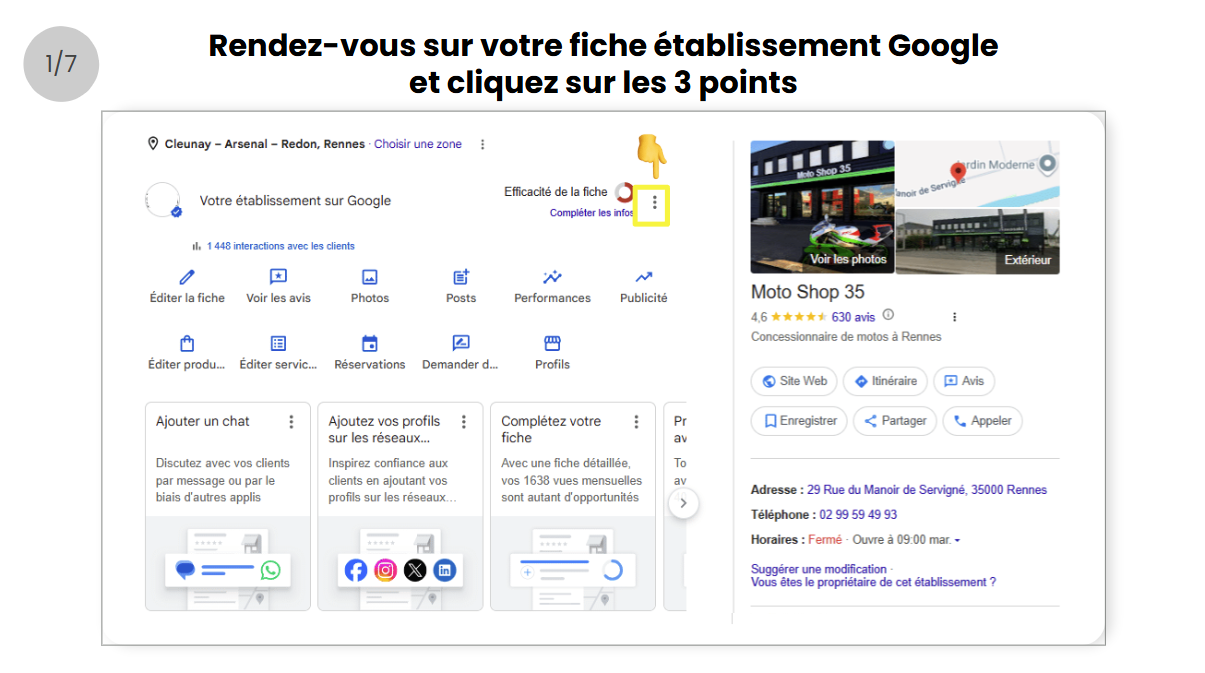
- Rendez-vous sur votre fiche d’établissement Google, de préférence depuis un ordinateur et cliquez sur les 3 points
☝️ Assurez-vous d’être connecté avec le compte Google propriétaire de votre fiche établissement existante, sinon changer depuis “Gérer mon compte”
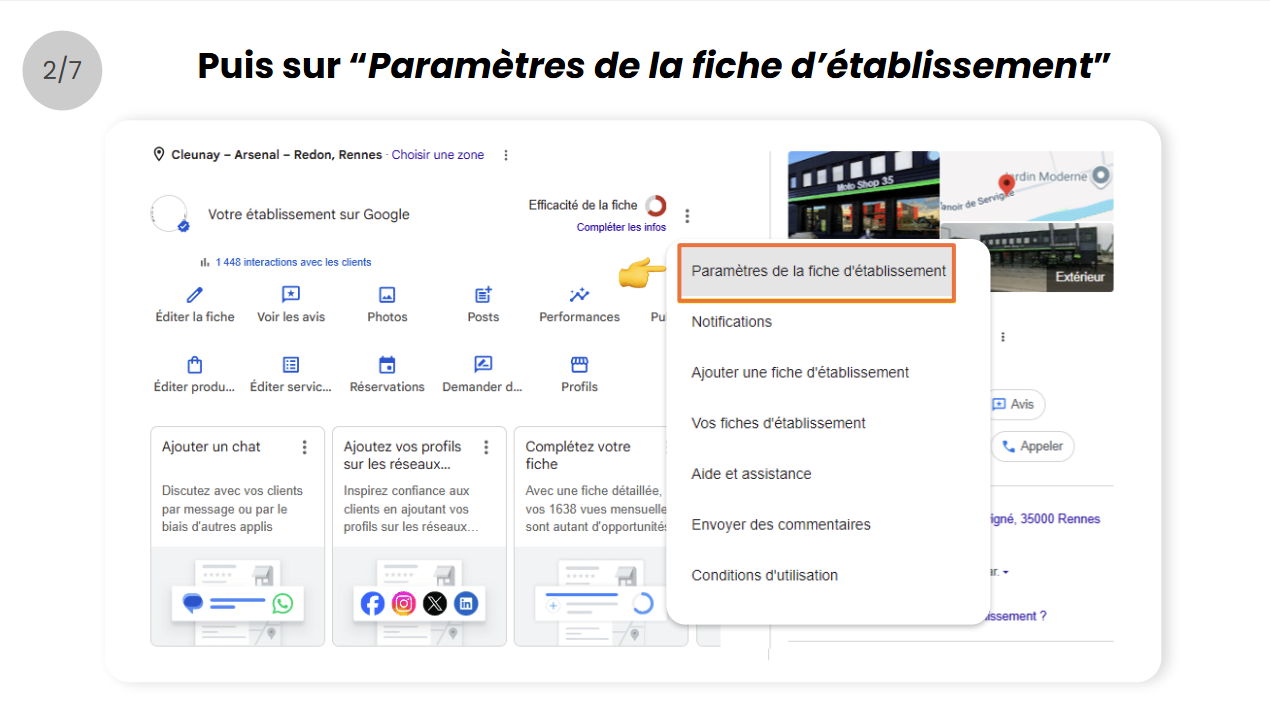
- Puis ouvrez le menu Paramètres de la fiche d’établissement
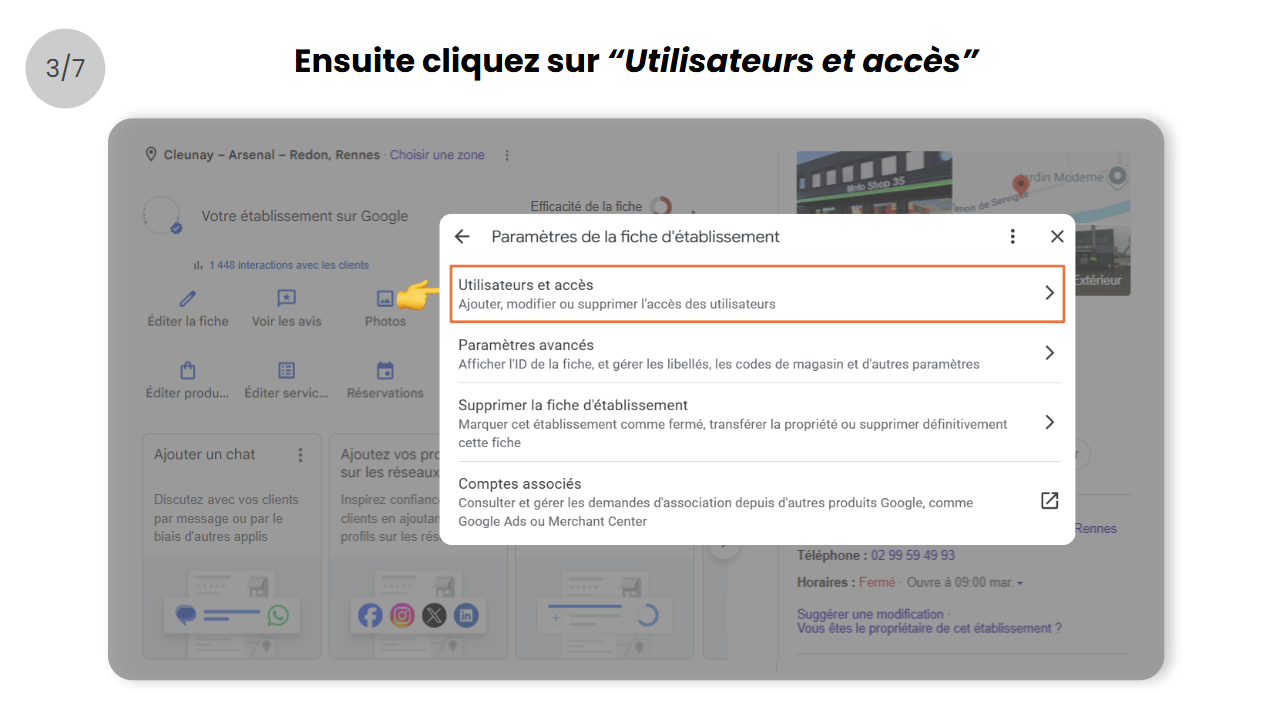
- Cliquez sur le menu Utilisateurs et accès
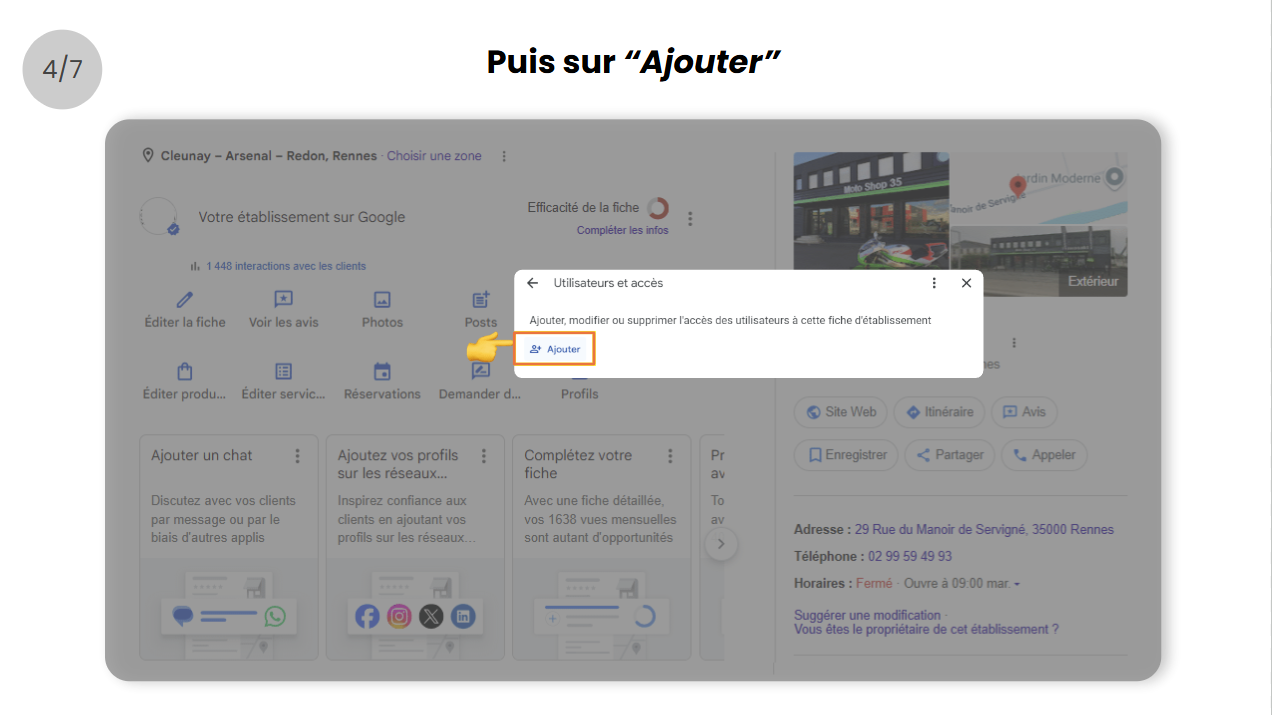
- Puis sur Ajouter
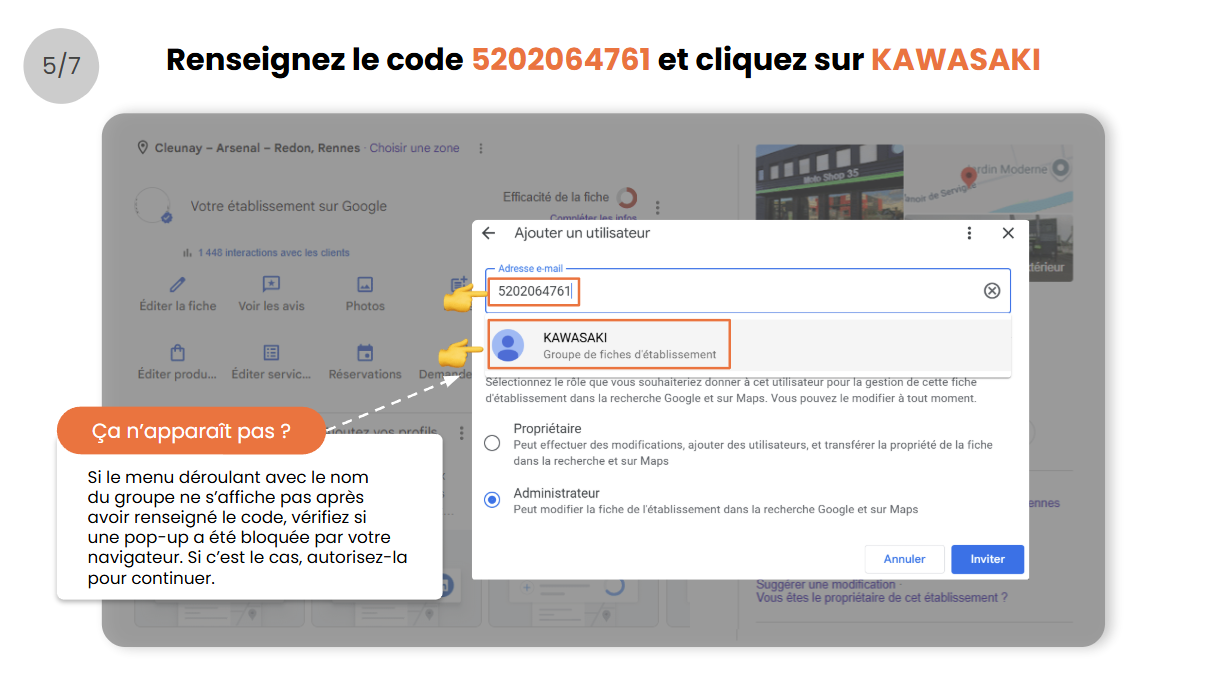
- Renseignez le code 5202064761 dans le champ adresse email et cliquez sur KAWASAKI (si le menu déroulant avec le nom du groupe ne s’affiche pas après avoir renseigné le code, vérifiez si une pop-up a été bloquée par votre navigateur. Si c’est le cas, autorisez-la pour continuer).
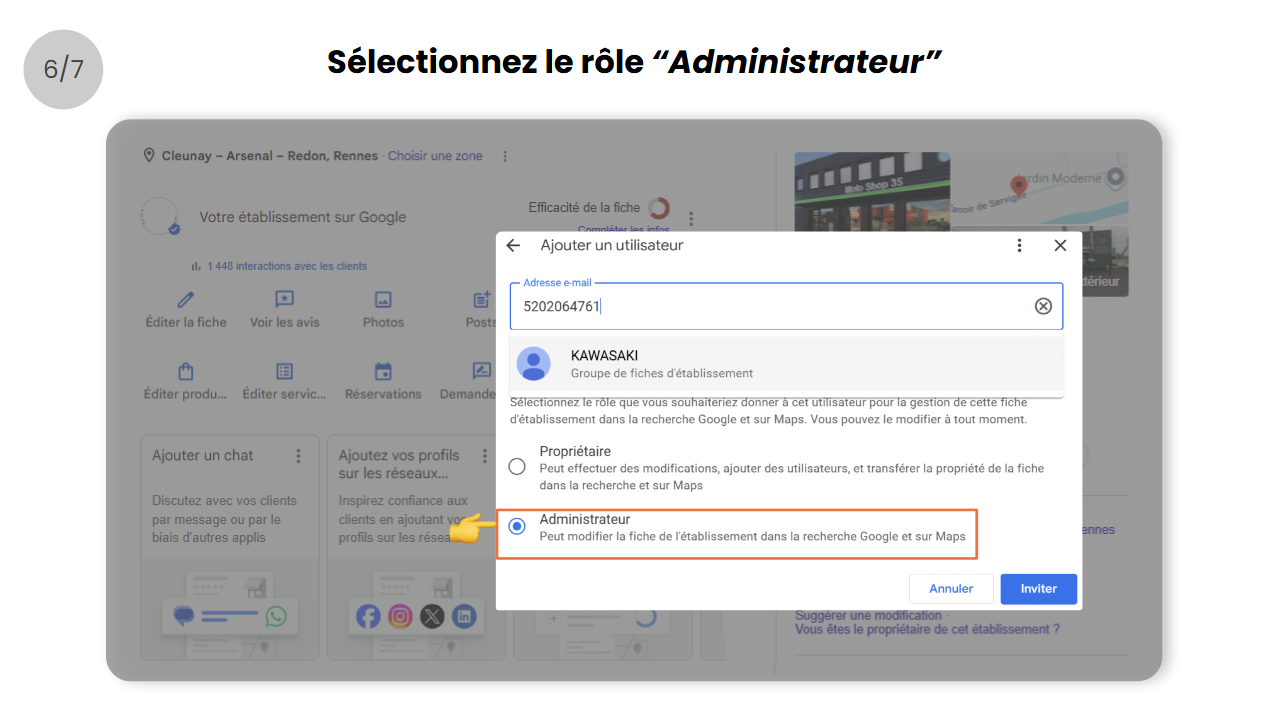
- Sélectionnez le rôle Administrateurs
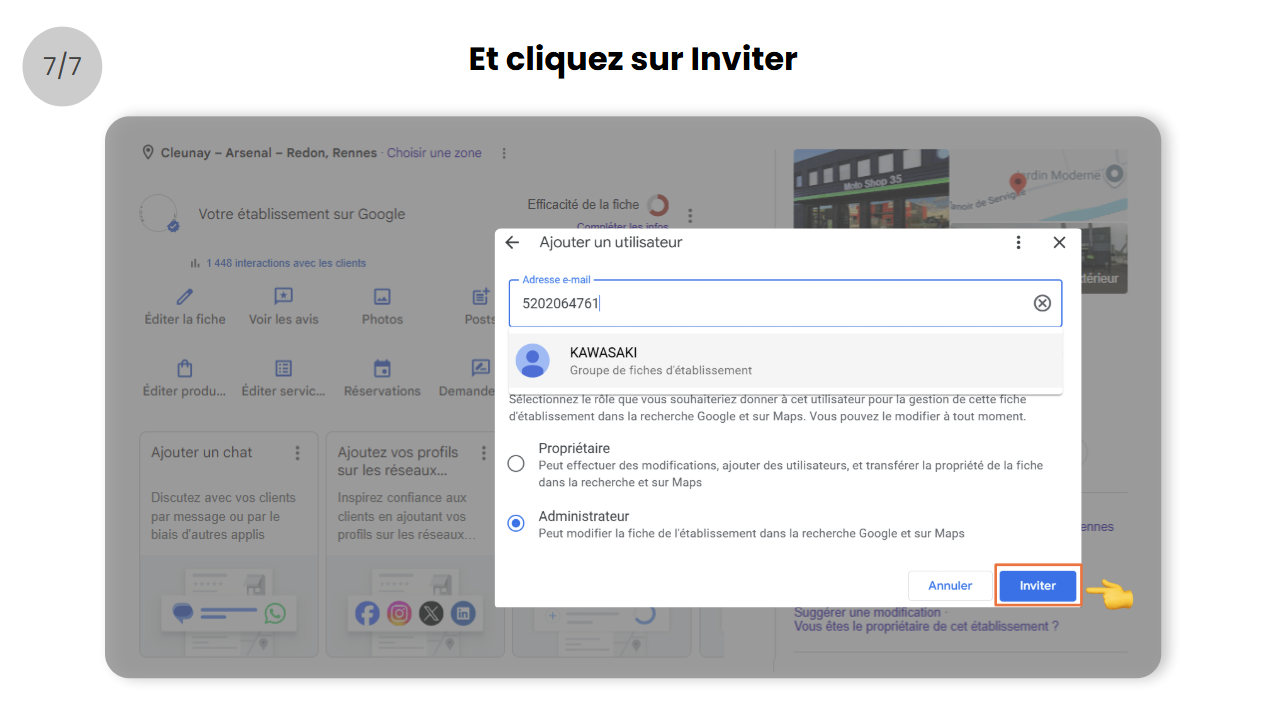
- Et cliquez sur Inviter
- Rendez-vous sur votre fiche d’établissement Google, de préférence depuis un ordinateur et cliquez sur les 3 points
Besoin d’aide sur le paramétrage ?
Contactez le service client Digitaleo à cette adresse : serviceclient@digitaleo.com
En partageant la gestion de votre fiche d’établissement Google, vous donnez accès à Digitaleo aux données suivantes : nom, prénom et coordonnées de la fiche Google (nom de l’établissement, adresse, horaires, téléphone).

ducati-configuration

Bénéficiez de l’accompagnement
Clé en Main Digitaleo
Pour faire remonter votre établissement dans les top résultats Google !
It's very simple
Partagez avec Terranimo la gestion de votre fiche Google.
This step is essential if you want to benefit from Digitaleo’s turnkey support.
En partageant votre fiche, vous en restez propriétaire et conservez toutes vos photos, avis et autres données existantes. Vous donnez néanmoins accès au réseau Terranimo aux données suivantes : nom, prénom et coordonnées de la fiche Google (nom de l’établissement, adresse, horaires, téléphone).
-
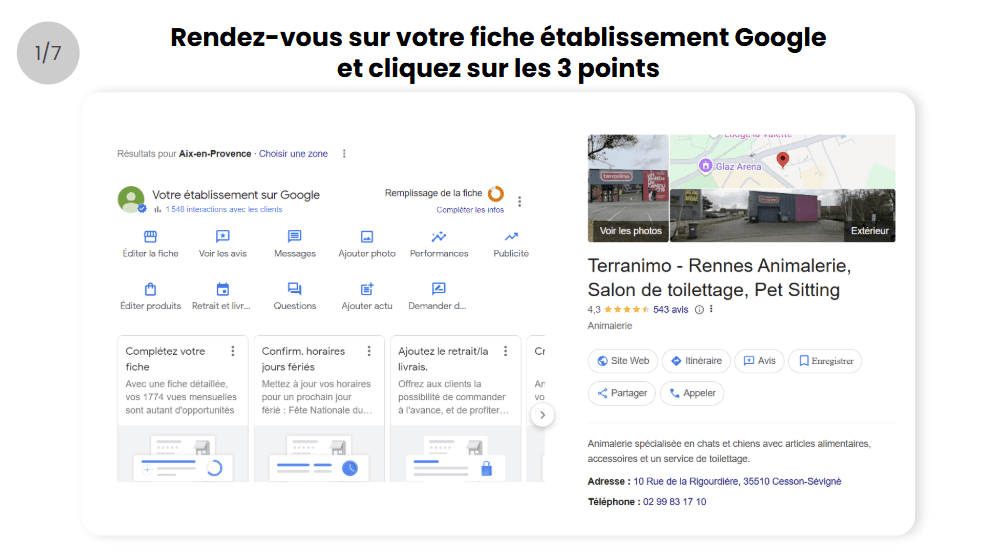
- Rendez-vous sur votre fiche d’établissement Google, de préférence depuis un ordinateur et cliquez sur les 3 points
☝️ Assurez-vous d’être connecté avec le compte Google propriétaire de votre fiche établissement existante, sinon changer depuis “Gérer mon compte”
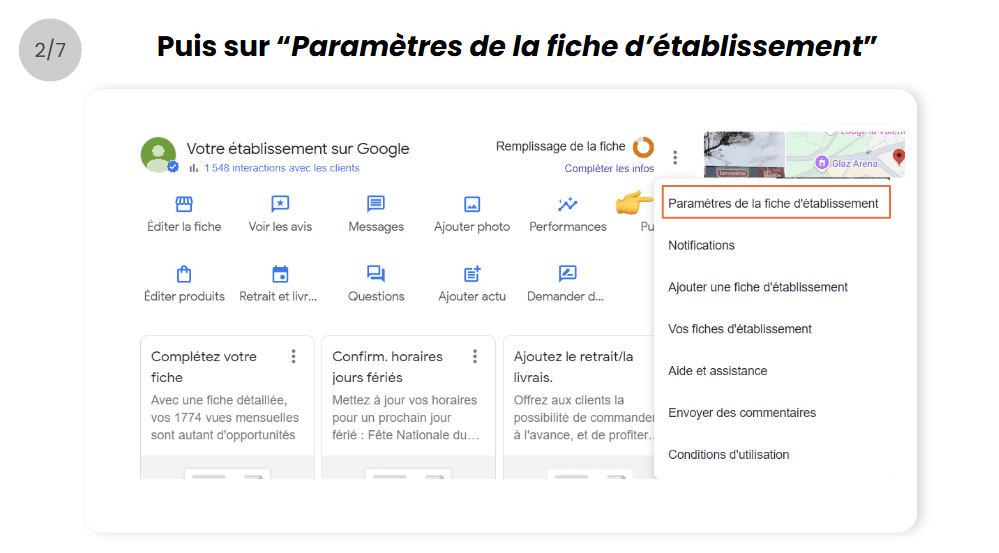
- Puis ouvrez le menu Paramètres de la fiche d’établissement
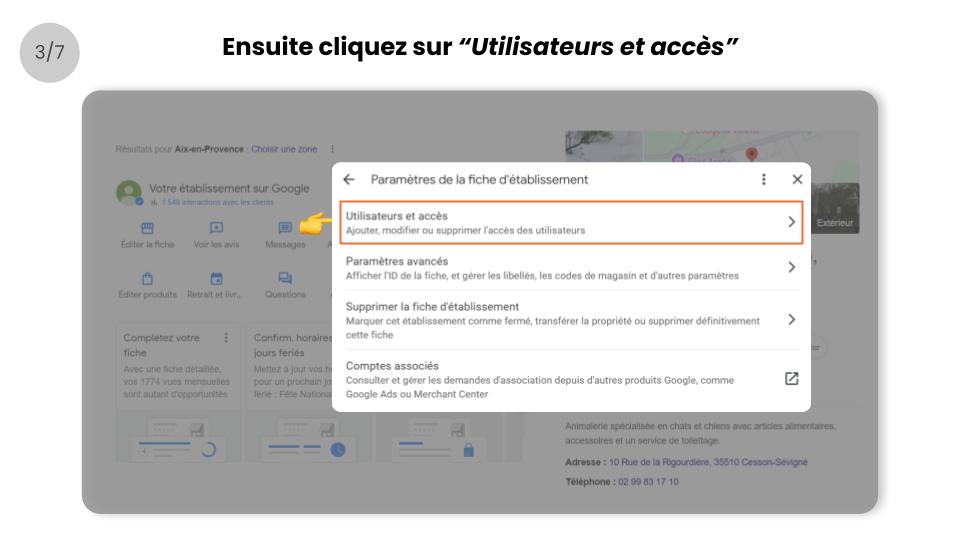
- Cliquez sur le menu Utilisateurs et accès
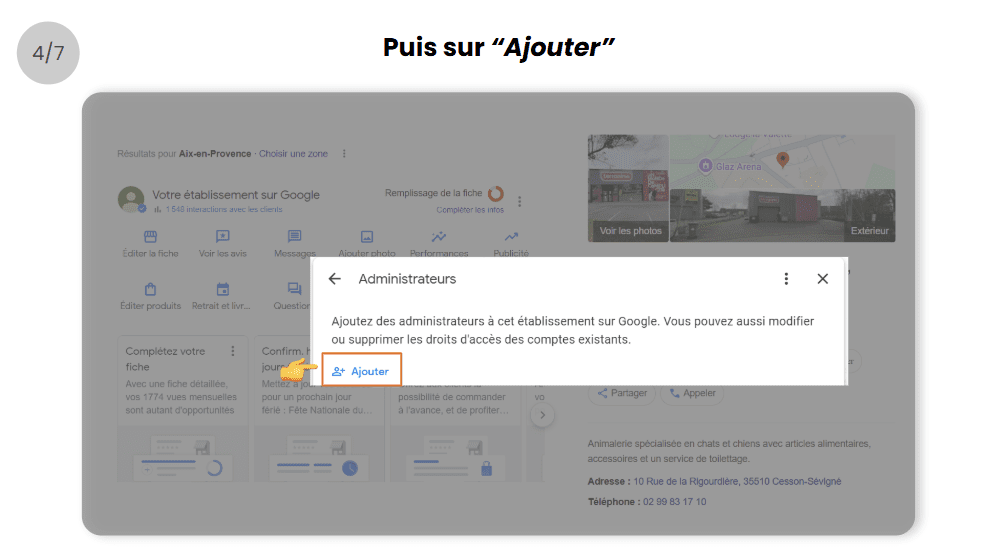
- Puis sur Ajouter
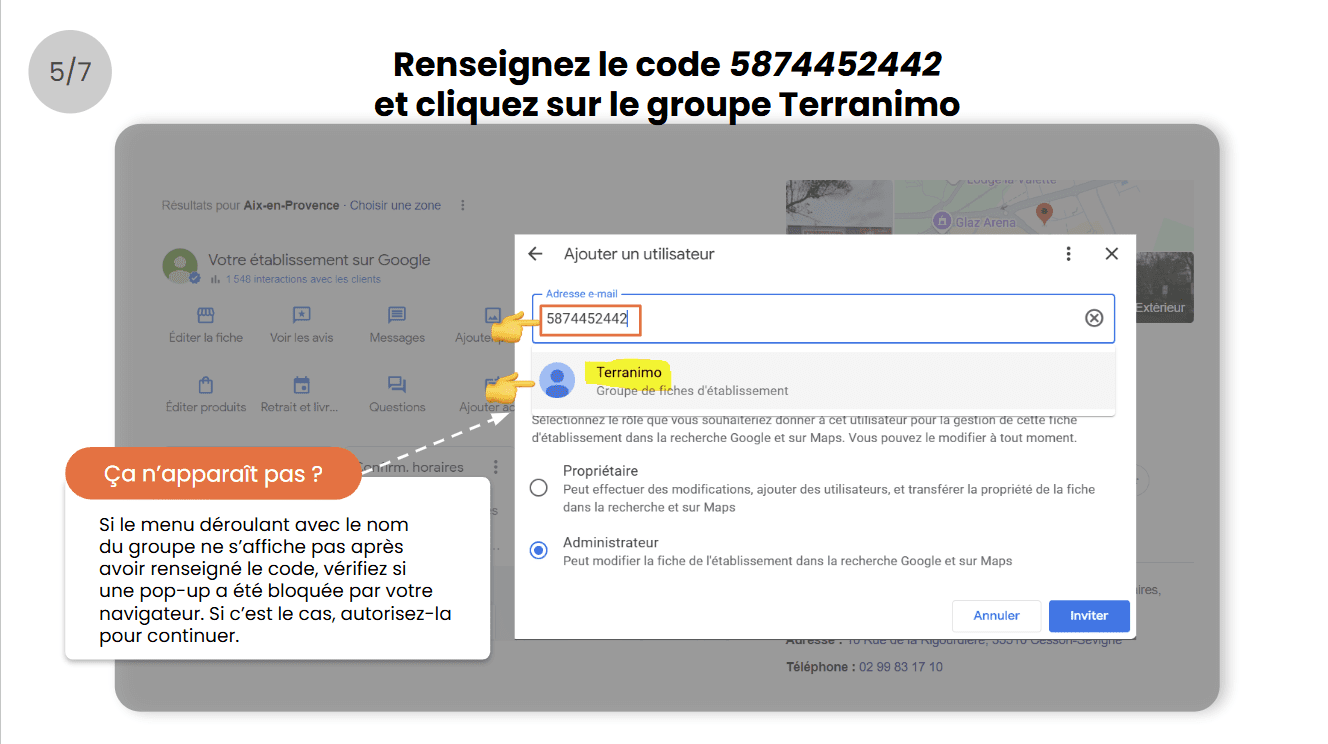
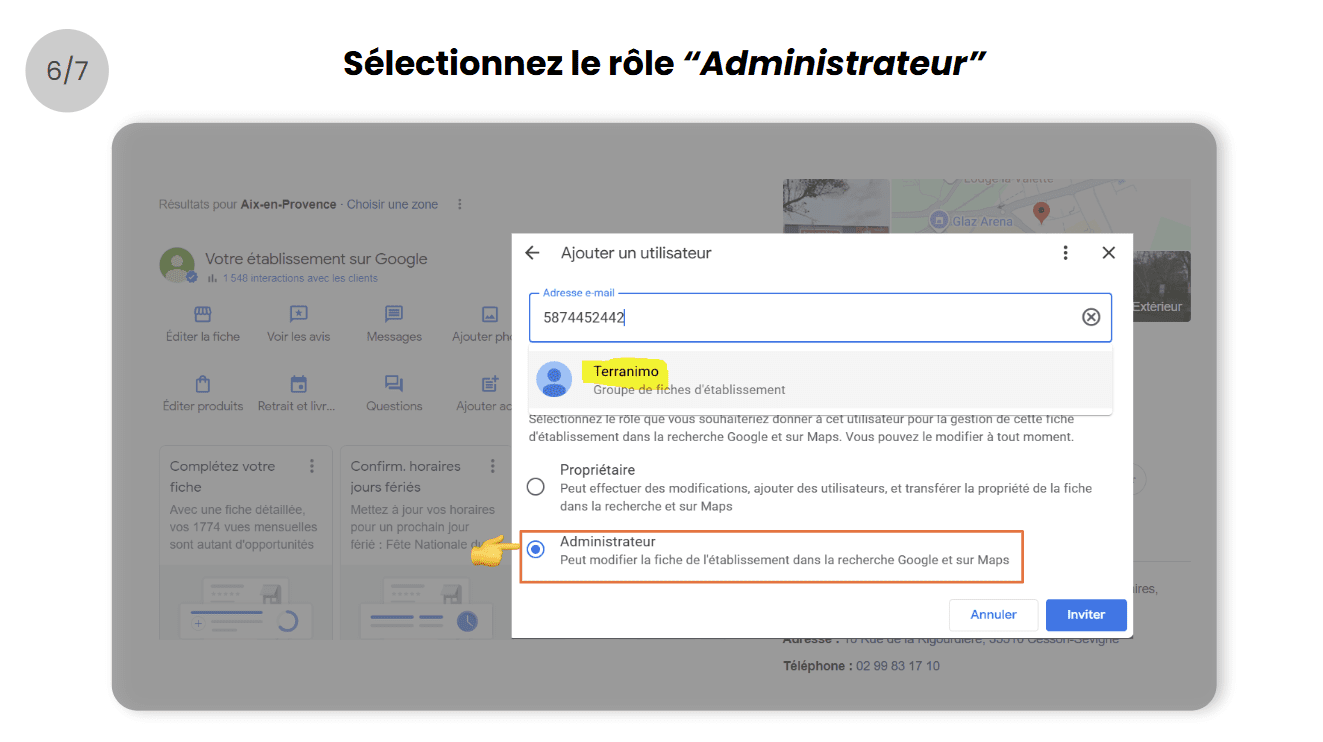
- Renseignez le code 5874452442 dans le champ adresse email et cliquez sur le groupe Terranimo (si le menu déroulant avec le nom du groupe ne s’affiche pas après avoir renseigné le code, vérifiez si une pop-up a été bloquée par votre navigateur. Si c’est le cas, autorisez-la pour continuer).
- Sélectionnez le rôle Administrateurs
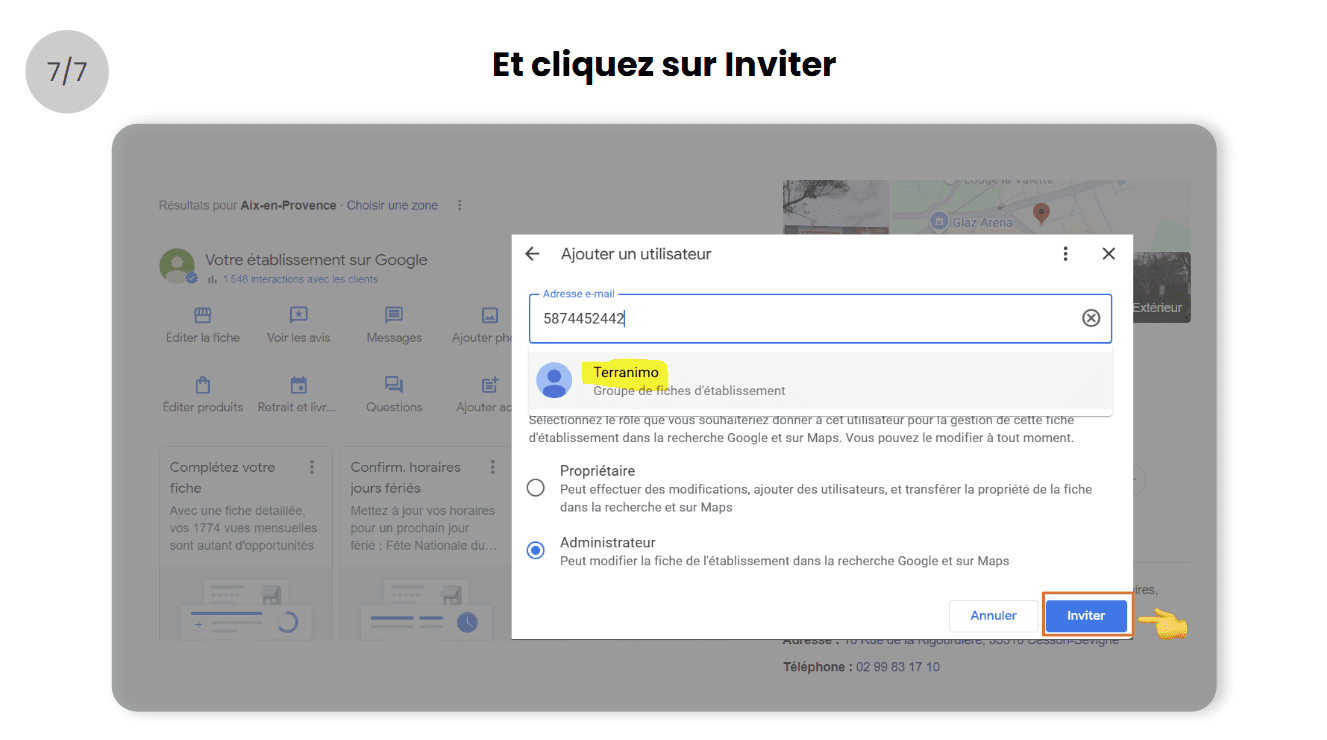
- Et cliquez sur Inviter
- Rendez-vous sur votre fiche d’établissement Google, de préférence depuis un ordinateur et cliquez sur les 3 points
Besoin d’aide sur le paramétrage ?
Contactez le service client Digitaleo à cette adresse : serviceclient@digitaleo.com
En partageant la gestion de votre fiche d’établissement Google, vous donnez accès à Digitaleo aux données suivantes : nom, prénom et coordonnées de la fiche Google (nom de l’établissement, adresse, horaires, téléphone).
ducati-configuration

Get turnkey support from Digitaleo
Get your business back in the top Google results!
It's very simple
Share with Ducati Benelux the management of your Google listing.
This step is essential if you want to benefit from Digitaleo’s turnkey support.
By sharing your profile, you retain ownership and keep all your photos, reviews and other existing data..
However, you give Ducati Benelux access to the following data : last name, first name and contact details of the Google listing (name of establishment, address, opening hours, telephone number)
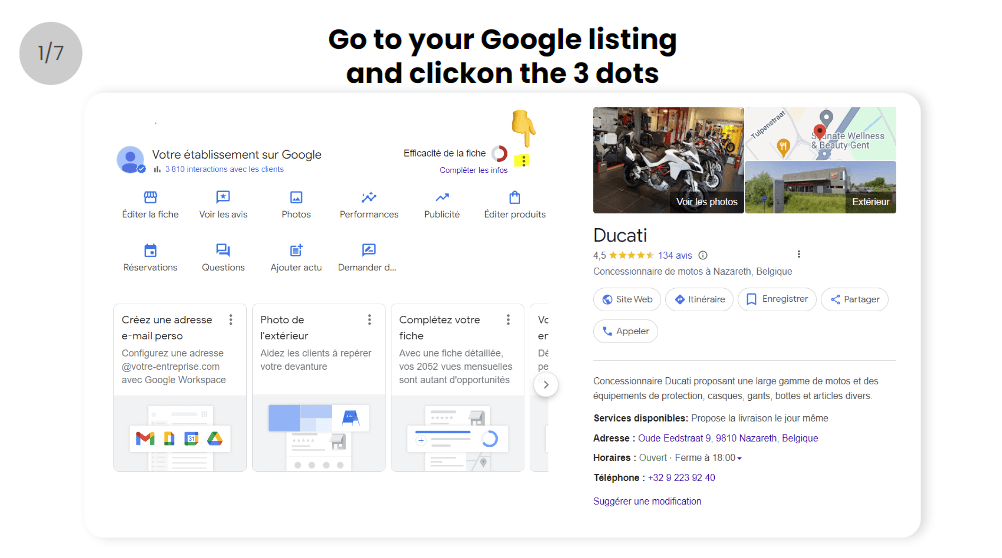
- Go to your Google listing and click on the 3 dots
☝️ Make sure you’re logged in with the Google account that owns your existing business listing, otherwise change from “Manage my account
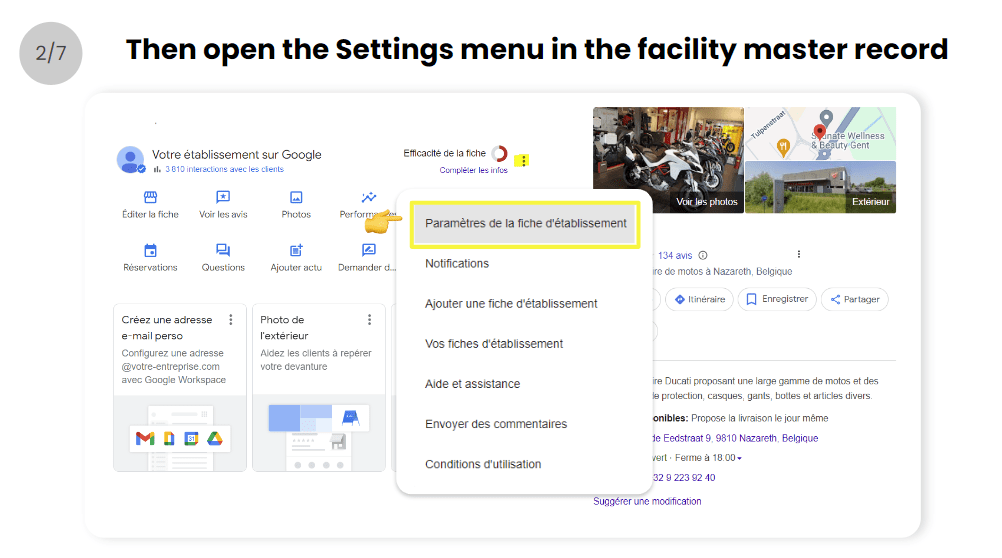
- Then open the Settings menu in the facility master record
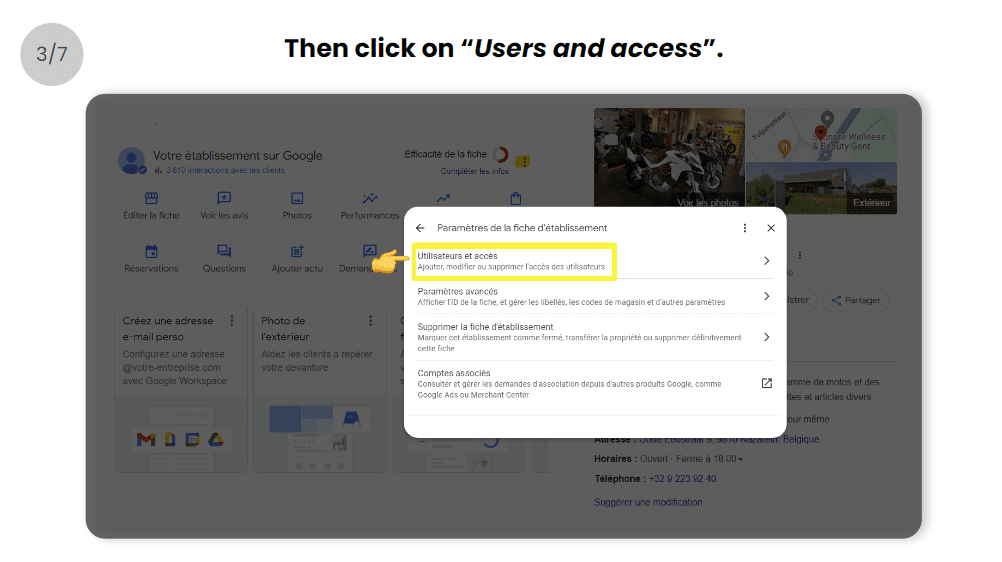
- Click on Users and access
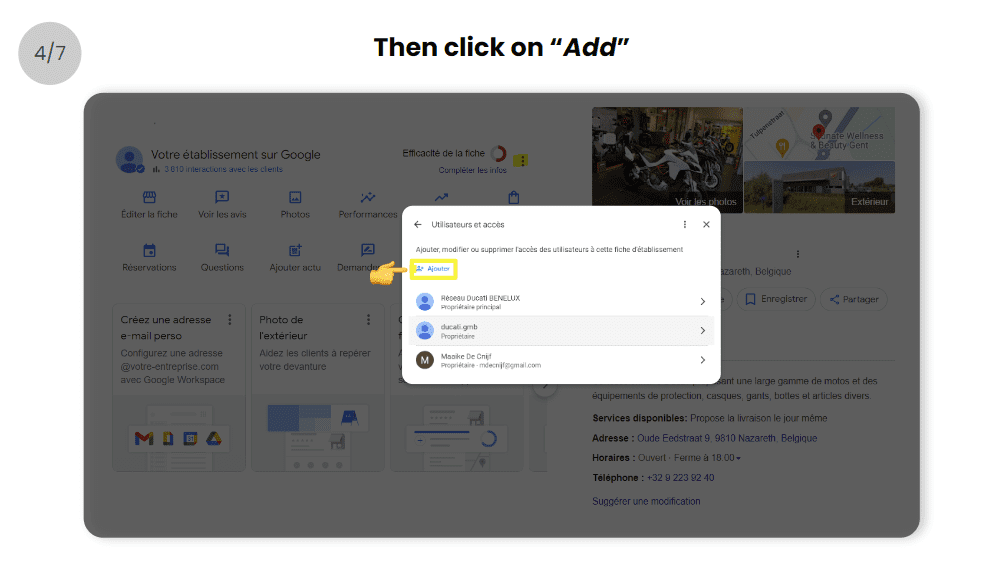
- Then click on Add
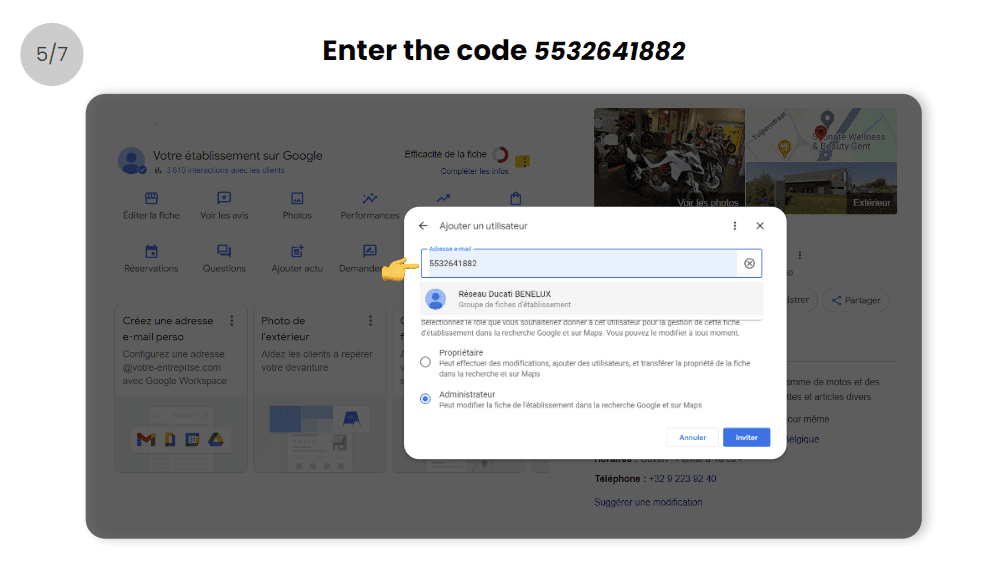
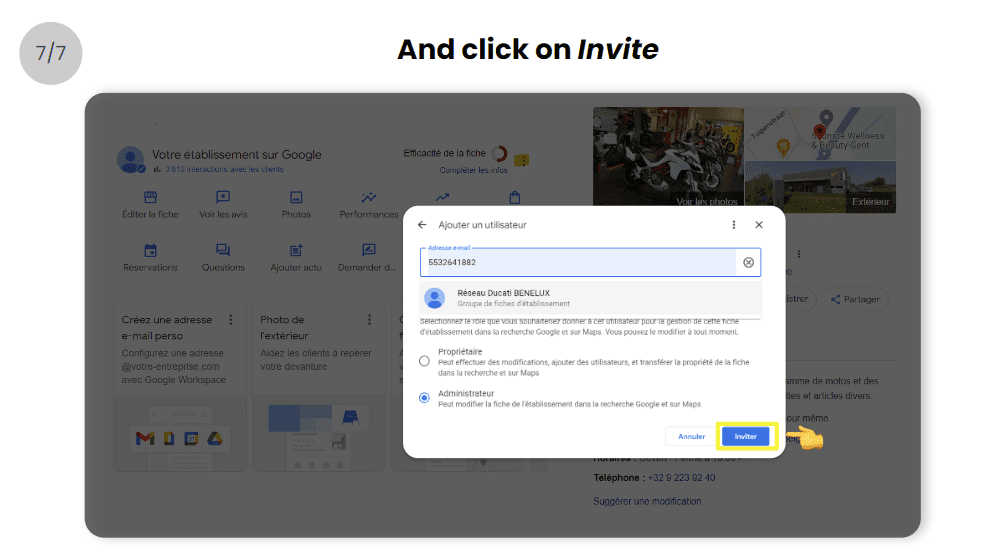
- Enter the code 5532641882 in the email address
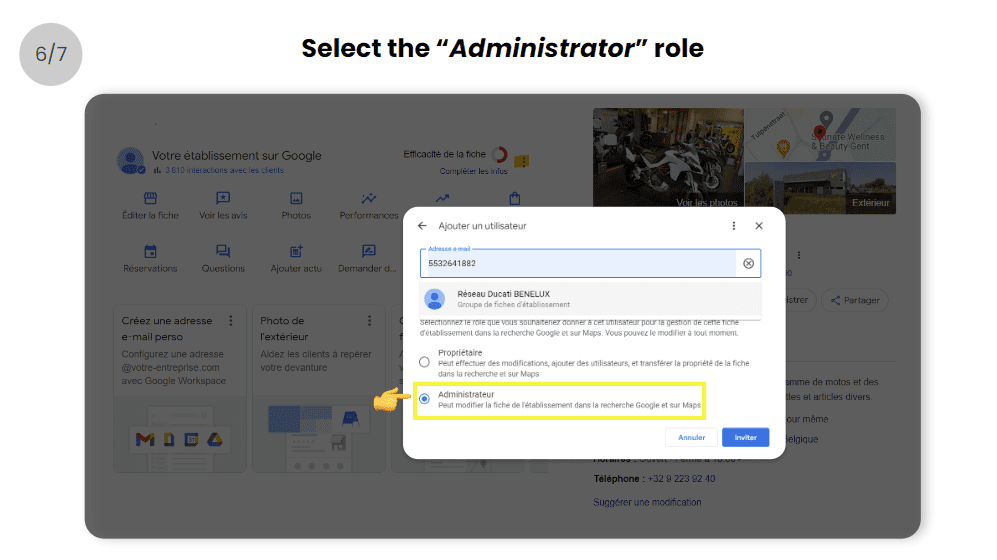
- Select role Administrator
- And click on Invite
Need help with settings?
Contact Digitaleo customer service at serviceclient@digitaleo.com By sharing the management of your Google business listing, you give Digitaleo access to the following data: name, first name and contact details of the Google listing (business name, address, opening hours, telephone number).

ducati-uk-configuration
Get turnkey support from Digitaleo
Get your business back in the top Google results!
It's very simple
Share with Ducati UK the management of your Google listing.
This step is essential if you want to benefit from Digitaleo’s turnkey support.
By sharing your profile, you retain ownership and keep all your photos, reviews and other existing data..
However, you give Ducati UK access to the following data : last name, first name and contact details of the Google listing (name of establishment, address, opening hours, telephone number)
- Go to your Google listing and click on the 3 dots
☝️ Make sure you’re logged in with the Google account that owns your existing business listing, otherwise change from “Manage my account
- Then open the Settings menu in the facility master record
- Click on Users and access
- Then click on Add
- Enter the code 5281413567 in the email address
- Select role Administrator
- And click on Invite
Need help with settings?
Contact Digitaleo customer service at serviceclient@digitaleo.com By sharing the management of your Google business listing, you give Digitaleo access to the following data: name, first name and contact details of the Google listing (business name, address, opening hours, telephone number).
ducati-deutshland-configuration
Get turnkey support from Digitaleo
Get your business back in the top Google results!
It's very simple
Share with Ducati Deutshland the management of your Google listing.
This step is essential if you want to benefit from Digitaleo’s turnkey support.
By sharing your profile, you retain ownership and keep all your photos, reviews and other existing data..
However, you give Ducati Deutshland access to the following data : last name, first name and contact details of the Google listing (name of establishment, address, opening hours, telephone number)
- Go to your Google listing and click on the 3 dots
☝️ Make sure you’re logged in with the Google account that owns your existing business listing, otherwise change from “Manage my account
- Then open the Settings menu in the facility master record
- Click on Users and access
- Then click on Add
- Enter the code 5855263342 in the email address
- Select role Administrator
- And click on Invite
Need help with settings?
Contact Digitaleo customer service at serviceclient@digitaleo.com By sharing the management of your Google business listing, you give Digitaleo access to the following data: name, first name and contact details of the Google listing (business name, address, opening hours, telephone number).
ducati-configuration
Get turnkey support from Digitaleo
Get your business back in the top Google results!
It's very simple
Share with Ducati Benelux the management of your Google listing.
This step is essential if you want to benefit from Digitaleo’s turnkey support.
By sharing your profile, you retain ownership and keep all your photos, reviews and other existing data..
However, you give Ducati Benelux access to the following data : last name, first name and contact details of the Google listing (name of establishment, address, opening hours, telephone number)
- Go to your Google listing and click on the 3 dots
☝️ Make sure you’re logged in with the Google account that owns your existing business listing, otherwise change from “Manage my account
- Then open the Settings menu in the facility master record
- Click on Users and access
- Then click on Add
- Enter the code 5532641882 in the email address
- Select role Administrator
- And click on Invite
Need help with settings?
Contact Digitaleo customer service at serviceclient@digitaleo.com By sharing the management of your Google business listing, you give Digitaleo access to the following data: name, first name and contact details of the Google listing (business name, address, opening hours, telephone number).
